


AI designers turn a written prompt or an existing brand file into an editable visual draft in minutes, not days. They generate social graphics, UI screens, brand assets, and slide decks that you can still open, adjust, and hand off to production, not just look at. The catch: they’re fastest at ideation and rapid prototyping, and still need a human for final brand judgment and complex user experience decisions.
TL;DR:
- Most AI design tools support importing brand assets and generate editable files with layers, not just flattened images.
- Quality and usability depend heavily on prompt controls, export formats, and the ability to lock brand elements before generation.
- A structured workflow involves drafting multiple variations, refining in the properties panel, and exporting early to catch issues before scaling production.
- Pricing varies from free tiers with limited features to enterprise plans, with actual costs driven by credits and export caps rather than sticker prices.
- Ethical use requires verifying licensing, maintaining human review, and avoiding reliance on AI outputs as final, unreviewed assets.
Table of Contents
- What Can AI Designers Actually Do?
- How Agentic Canvases Turn Prompts Into Editable Files
- What to Look for When Evaluating an AI Design Tool
- The Workflow: From Prompt to Production-Ready File
- What Do AI Design Tools Cost?
- How Do You Choose the Right AI Designer for Your Team?
- Ethical Considerations and Responsible Use of AI in Design
- Where AI Designers Still Fall Short
- Comparing the Major AI Design Tools
- How AI Design Tools Fit Into Your Existing Software Stack
- What’s Next for AI-Driven Design
- [Adapting AI Designs for Real Apparel and Merch Production is easier with help from a New York dresses store that knows how to bring digital designs to fabric production smoothly.](#adapting-ai-designs-for-real-apparel-and-merch-production-is-easier-with-help-from-a-new-york-dresses-storehttpsdressmeupnycom-that-knows-how-to-bring-digital-designs-to-fabric-production-smoothly)
- Turning AI-Generated Designs Into Real Apparel With Tekton LA
- Sources
- FAQ
What Can AI Designers Actually Do?
The term “AI designer” covers a wider job than most people expect. At the core, these tools do text-to-design generation: you describe a graphic, a landing page, or a deck slide, and the tool composes a layout using real typography and grid logic instead of guessing at pixels. Most also handle template refinement, taking something you already built and generating variations on color, copy, or layout.
The more capable platforms go multi-modal, producing images, short video cuts, and slide decks from the same prompt thread. On the interface side, tools built for UI and prototype generation can produce working screens with clickable interactions, and some export directly to front-end code, which matters if you’re handing work to a developer.
Common jobs suited to this category:
- Social and ad graphics for a campaign, generated in batches with consistent sizing.
- UI mockups and prototypes for early product reviews.
- Brand-aware assets that apply an existing palette, font, and logo automatically.
- Slide decks and pitch materials built from a bullet outline.
Use AI for ideation and speed. Bring in a designer for final brand sign-off, accessibility review, or anything involving a genuinely complex user flow.
How Agentic Canvases Turn Prompts Into Editable Files
The mechanism behind the current wave of tools is what the industry calls an agentic canvas. Instead of spitting out a flat image, the AI acts more like an assistant sitting inside your file: it drafts a layout, offers variations, and lets you refine elements in place rather than starting over. Claude Design documents this workflow directly, importing a design system and generating drafts you can edit as native components.
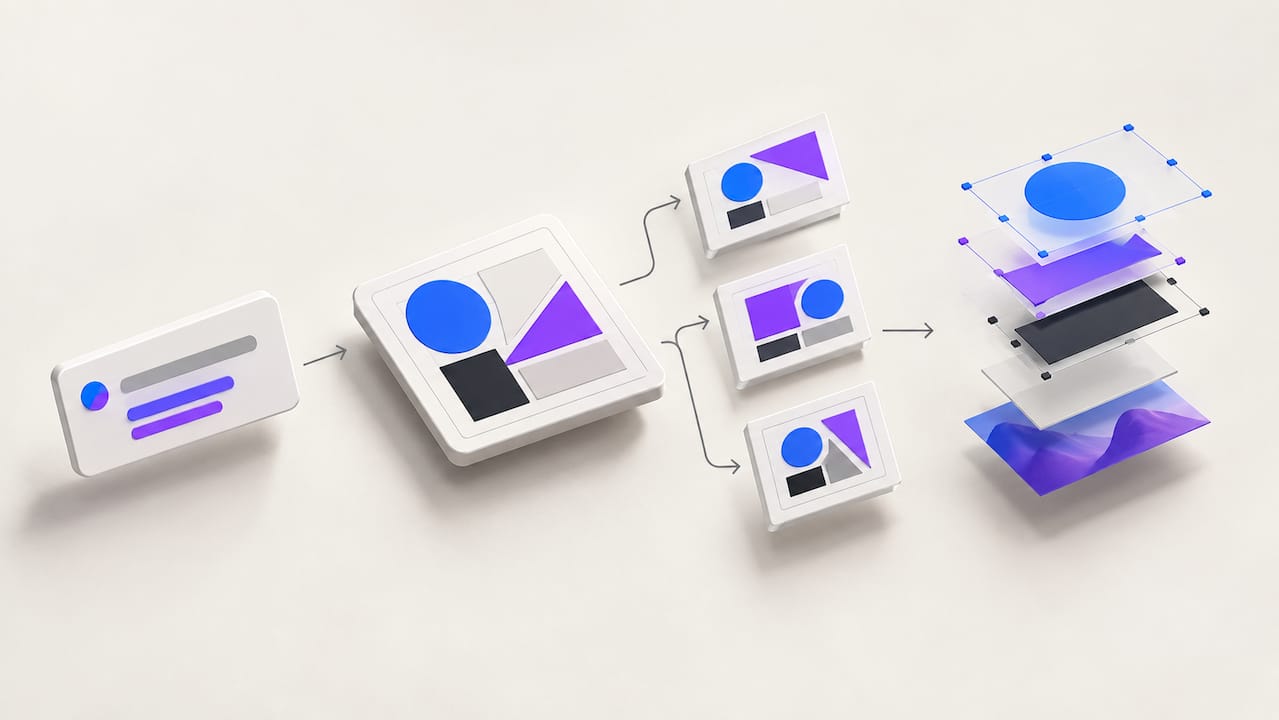
The distinction that matters most is between a flattened bitmap and an editable export. A flattened output is a picture of a design. An editable output is the design itself, with layers, text fields, and components still live. Academic work on this problem describes the strongest approach as an “imagine first, then act” loop: let the AI generate the concept, then have a coding layer write native HTML/CSS so the layers stay decoupled and editable instead of collapsing into a single image file.
That editability is also why export options matter so much. Code-backed exports to HTML/CSS, PPTX, or PDF mean a developer or print vendor can actually work with the file, not just admire it.
- Agentic canvas = active collaborator, not a one-shot image generator.
- Editable exports preserve layers and components.
- Design system imports lock outputs to your existing brand tokens.
Pro Tip: Before you generate anything, import your brand’s color and type tokens if the tool supports it. Locking those in first saves you from manually fixing five variations later.
What to Look for When Evaluating an AI Design Tool
Not every tool marketed as an “AI designer” produces something you can actually ship. Before committing to one, run it through this checklist:
- Brand system support. Can it import your logo, palette, and fonts, or are you stuck reapplying them by hand every time?
- Layered, editable exports. Confirm the output includes real vector paths and separate layers, especially if anything is headed to print.
- Export formats. Look for PDF, PPTX, and HTML/code export, since Claude Design’s documentation treats these paths as core, not bonus, features.
- Prompt controls and variation generation. You want the ability to regenerate just one element, not the whole composition.
- Collaboration and governance. Team plans should let you lock brand assets so one person’s experimental prompt doesn’t drift off-brand.
- Admin and usage limits. Ask how generation credits or seat limits scale before you’re mid-project and blocked.
A tool that fails the first two items usually isn’t worth the subscription, no matter how polished its demo looks.
The Workflow: From Prompt to Production-Ready File
A clean workflow saves more time than any single feature. Here’s the sequence that keeps rework to a minimum:
- Write a structured brief. Specify audience, format, dimensions, and tone in a sentence or two, and import brand tokens if the platform allows it.
- Generate multiple directions. Ask for three to five variations, then narrow to two or three worth developing further, rather than fixating on the first result.
- Refine in the properties panel. Adjust spacing, color, and copy directly rather than re-prompting from scratch, and check legibility and contrast while you’re in there.
- Export early and test a sample. Pull a print-ready file or a live web build before committing to a full run or launch.
Pro Tip: Export a single test file before you finalize a batch. Catching a color shift or a cropped logo on one file is a five-minute fix; catching it after 200 shirts are printed is not.
What Do AI Design Tools Cost?
Pricing in this category follows a familiar shape, but the caps hidden inside each tier matter more than the sticker price.
- Free or limited tiers are genuinely useful for testing a tool’s output quality, but they typically restrict export formats or block brand-system features entirely.
- Individual subscriptions suit a solo marketer or founder generating assets regularly, usually with higher generation limits and full export access.
- Team plans add shared brand libraries and collaboration, which matters once more than one person is generating on-brand assets.
- Enterprise tiers bring single sign-on, governance controls, and higher usage ceilings, which is where brand consistency at scale actually gets enforced.
Watch for credit-based generation limits and export caps specifically. A plan that looks cheap on paper can get expensive fast if every regeneration burns a credit and you’re iterating heavily, as free and limited tiers on platforms like Figma’s AI design generator illustrate.
How Do You Choose the Right AI Designer for Your Team?
Run every serious candidate through the same five questions during a demo, and don’t accept a vague answer to any of them:
- Are outputs editable layers, or a flattened image dressed up as a “design file”?
- Can it import an existing design system, or does every project start from zero?
- What export formats does it actually support, PDF, PPTX, HTML, or code?
- What are the real usage limits once you’re past the free tier?
- Does it offer admin controls to keep a team’s output on-brand?
Red flags are easy to spot once you’re looking: flattened-only outputs, pricing pages that hide limits behind “contact us,” and no brand governance features at all for team accounts.
The investment of an hour trialing two or three tools is worth it given how fast adoption is moving. Figma’s State of the Designer research found that 72% of designers now use generative AI in their work, and 91% of those who increased their AI usage said it improved their output quality. That’s not a fringe workflow anymore.
Ethical Considerations and Responsible Use of AI in Design
The fastest way to get burned by an AI designer is treating its output as automatically safe to publish. Generated images can echo existing artists’ styles closely enough to raise real intellectual-property questions, and generated layouts can accidentally lift a font or icon set that isn’t licensed for commercial use. Before anything goes to print or ships to a client, check the tool’s terms for commercial usage rights and confirm the assets it pulled in are actually cleared.
There’s also a labor conversation worth taking seriously. AI designers are genuinely good at producing volume: a dozen social variants, a batch of icon options, a first-pass layout. That’s valuable, but it also means junior design work, the kind that used to build skill through repetition, gets automated first. Teams that lean on AI for every draft risk losing the internal pipeline that trains their next senior designer.
Bias is a quieter risk. Models trained on existing design libraries tend to reproduce whatever aesthetic dominates that training data, which can mean stock imagery skewing toward narrow representations of age, body type, or culture unless you actively prompt against it. If your brand serves a broad audience, it’s worth reviewing generated imagery specifically for who’s missing, not just whether it looks polished.
Responsible use, practically, means three things: verify licensing before publishing, keep a human reviewing anything client-facing or public, and don’t let AI output replace the junior-level work that builds design talent inside your team. None of that means avoiding these tools. It means treating them as a fast first draft, not a final decision-maker.
Where AI Designers Still Fall Short
AI designers are excellent at generating options fast and genuinely weak at a handful of things that matter a lot in professional work. Complex, multi-step user experience flows, the kind involving conditional logic, edge cases, and accessibility compliance across a dozen screen states, are still better handled by a human who understands the whole system, not just the screen in front of them.
Consistency across a large asset library is another soft spot. Generate fifty social graphics from the same prompt and you’ll often see subtle drift in spacing, color values, or type weight between them, even with brand tokens locked in. That drift is invisible in isolation and glaring once you lay the assets side by side.
There’s also a real gap between an impressive first draft and a finished file. Many tools produce something that looks complete at a glance but falls apart under close inspection: kerning that’s slightly off, a color that’s technically off-brand, an icon that doesn’t match your actual icon set. Research on editable design generation frames the core technical problem plainly: without a proper layer-preserving export pipeline, you get flattened outputs that require a full rebuild rather than a quick fix.
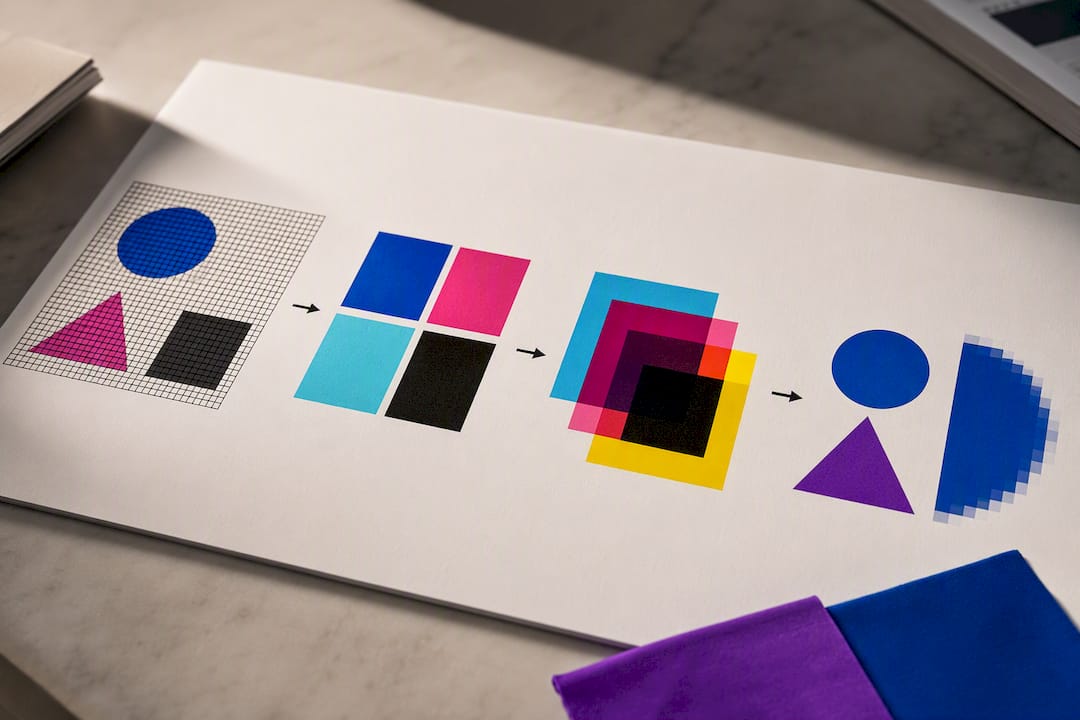
Print work adds its own limitations. A layout that looks sharp on a screen can fail at production resolution, use RGB colors that don’t translate to CMYK, or rely on a raster logo that pixelates the moment it’s scaled up for a banner. None of this makes AI designers unusable. It just means the “generate and ship immediately” fantasy doesn’t hold up once real production constraints show up.
Comparing the Major AI Design Tools
The category splits into a few distinct approaches rather than one crowded field of near-identical products. Understanding the split matters more than picking a single “best” tool, since the right fit depends on what you’re actually producing.
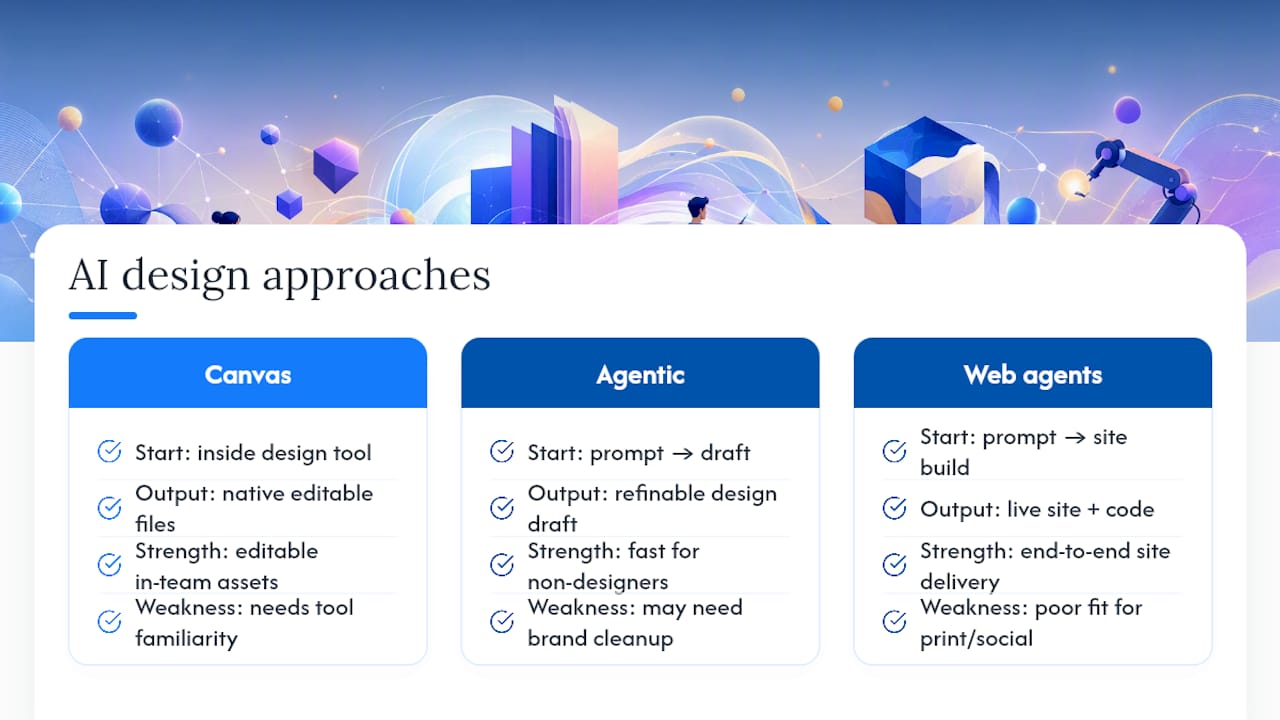
Canvas-embedded generators, the category Figma’s AI design generator represents, work inside an existing design tool you likely already use. Strength: outputs land as editable native components inside a file your team already knows how to finish. Weakness: you still need baseline familiarity with that design tool to get full value.
Agentic, brief-to-draft platforms like Claude Design take a prompt and produce a fuller draft, including layout logic and design-system awareness, then let you refine in place. Strength: fast for people without design training who need a usable starting point. Weakness: heavier drafts sometimes need more cleanup to match exact brand specifications than a canvas-native tool would.
Website- and code-oriented design agents, exemplified by platforms like Framer, extend the same agentic idea to full site builds, generating and refining page content and code together. Strength: end-to-end, from idea to a live, editable site. Weakness: less suited to a one-off social graphic or print asset, since the whole system is built around web output.
No single tool wins across every use case. A marketer producing a week of social content, a product team prototyping a new screen, and a founder building a landing page are solving different problems, and the right AI designer for each looks different too.
How AI Design Tools Fit Into Your Existing Software Stack
An AI designer that lives in isolation from the rest of your stack creates more friction than it saves. The tools worth adopting connect to where your work already happens: cloud storage for asset libraries, project management platforms for handoff, and code repositories for anything headed to a live product.
Design-system import is the connective tissue that makes this work. When a tool can pull in your existing brand tokens, fonts, and component library, every new asset starts aligned instead of requiring a manual fix pass. That’s the mechanism Claude Design builds around, importing an existing system rather than starting from a blank canvas each time.
Export integration matters just as much on the way out. A tool that only outputs a flattened image forces someone to rebuild the file in another program before a developer or printer can use it. Code-backed exports to HTML/CSS solve this for web work, while PDF and PPTX exports solve it for print vendors and presentation decks respectively.
The practical test: before adopting a tool, map out where its output needs to go next, whether that’s a developer’s codebase, a print shop’s file queue, or a slide deck for a client meeting, and confirm the export path actually gets it there cleanly.
What’s Next for AI-Driven Design
The clearest trend right now is architectural, not cosmetic. Rather than treating AI as a feature bolted onto existing software, emerging platforms are building AI into the underlying structure of the tool itself. Research on large-language-model-driven design frameworks describes this shift directly: the strongest systems let AI handle information gathering and modular generation while the human stays focused on higher-level creative and strategic decisions, rather than manual production work.
Expect three concrete shifts to keep accelerating. First, prototypes will increasingly ship with working code attached, not just a visual mockup, narrowing the gap between design and development handoff. Second, design-system awareness will get deeper, with tools tracking brand consistency automatically across hundreds of generated assets instead of relying on a human to catch drift. Third, multi-modal generation, producing image, video, and copy from a single brief in one pass, will become standard rather than a premium feature.
None of this points toward AI replacing designers. It points toward AI absorbing the repetitive, high-volume production work so human attention shifts toward judgment calls: brand fit, cultural context, and the kind of taste a model can approximate but not originate.
Adapting AI Designs for Real Apparel and Merch Production is easier with help from a New York dresses store that knows how to bring digital designs to fabric production smoothly.
A design that looks perfect on screen can fail on fabric if the file isn’t prepped correctly. AI-generated graphics typically export as raster images, but garment printing favors vector files for anything involving flat colors or type, since vector assets scale cleanly without pixelation. Check color mode, too: screens display in RGB, but print production runs on CMYK, and skipping that conversion is the single most common reason a shirt comes back looking duller than the mockup.
The practical sequence looks like this: prompt your AI designer for concepts, generate a few mockup variations, approve the direction, then export print-ready files, ideally as vector art or high-resolution raster, before handing them to a print partner. Getting the export format right at this stage prevents a reprint later. From there, production, whether that’s a short DTG run or a full screen-printed batch, takes over.
— Christian
Turning AI-Generated Designs Into Real Apparel With Tekton LA
Tekton LA is the production partner that picks up exactly where your AI designer leaves off. Once you’ve got an approved mockup, the work shifts from prompts and properties panels to color matching, substrate choice, and print-file checks, and that’s a different skill set entirely.
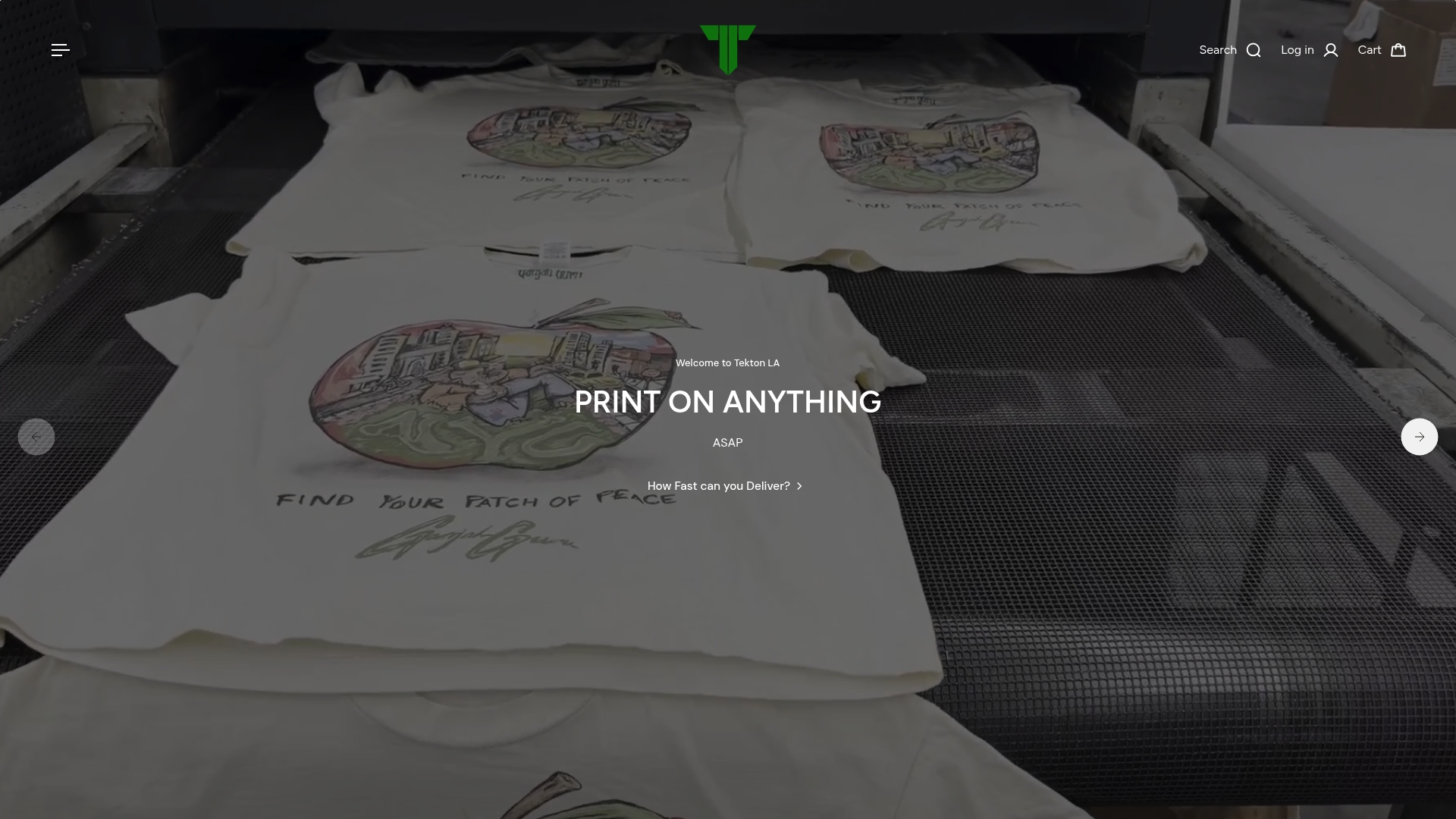
Tekton LA offers direct-to-garment, direct-to-film, screen printing, embroidery, and garment dyeing services with no minimum order quantity on blanks, so a single test shirt is a real option before you commit to a full run. That matters most right after an AI design session, when you want to see how a palette actually looks on fabric before scaling up. The team also emphasizes eco-friendly materials, and offers live event printing for brands that want that as an experience, not just a product.
If you’ve got an AI mockup ready, the fastest next step is uploading one file for a test print. Start with a Printers Shirt for a quick DTG check. Or explore garment dye options like the Garment Dye Shirt if your design leans into a softer, worn-in color. For questions about your specific file or a full quote, reach out through Tekton LA directly.
Sources
- Free AI Design Generator - Design Using AI | Figma
- 2609.04034 Editable Visual Design
- Nature article on LLM-driven design frameworks
FAQ
What Does an AI Designer Do?
An AI designer turns a written prompt or an uploaded file into an editable visual draft, generating social graphics, UI screens, brand assets, or slides that you can still adjust in a properties panel rather than a finished, locked image.
Is There a Free AI Designer?
Several platforms offer free or limited tiers good for testing output quality, though most restrict export formats or brand-system features until you upgrade, as seen with Figma’s AI design tools.
How Much Does AI Design Cost?
Pricing typically ranges from free limited tiers to individual subscriptions for regular personal use, up to team and enterprise plans with governance controls; the real cost driver is usually credit-based generation limits and export caps rather than the sticker price.
Is There a ChatGPT for Design?
Yes, purpose-built equivalents exist, including agentic canvas tools like Claude Design, which take a written brief and generate an editable draft rather than a flat image, closer to a conversational design assistant than a general chatbot.